Getting Started with Django - Working with Databases
Django is a powerful web framework that makes it easy to work with databases using its built-in ORM (Object-Relational Mapping) system. In this guide, we'll walk through database operations for a bookshop application, covering table creation, data insertion, querying, deletion, and modification.
1. Setting Up Django and the Database
- Before working with the database, ensure you have Django installed:
pip install django
- Create a new Django project:
django-admin startproject bookshop
cd bookshop
python manage.py startapp store
- Register the app in bookshop/settings.py:
INSTALLED_APPS = [
    'django.contrib.admin',
    'django.contrib.auth',
    'django.contrib.contenttypes',
    'django.contrib.sessions',
    'django.contrib.messages',
    'django.contrib.staticfiles',
    'store',  # Our new app
]
2. Creating Tables (Models)
Django uses models to define database tables. In store/models.py, define models for books and authors:
from django.db import models

class Author(models.Model):
    name = models.CharField(max_length=255)
    birth_date = models.DateField()

    def __str__(self):
        return self.name

class Book(models.Model):
    title = models.CharField(max_length=255)
    publication_date = models.DateField()
    author = models.ForeignKey(Author, on_delete=models.CASCADE)

    def __str__(self):
        return self.title
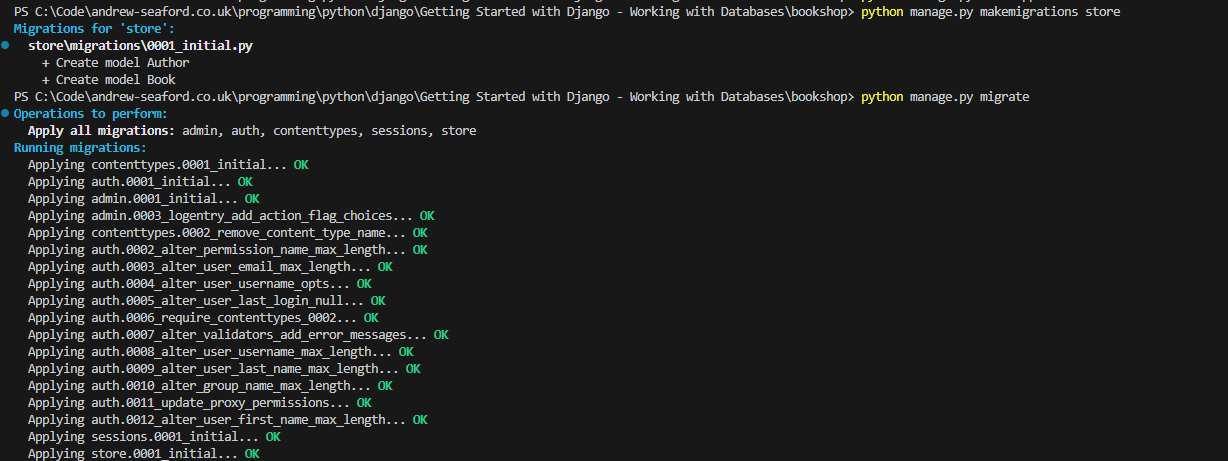
- Apply migrations to create the tables in the database:
python manage.py makemigrations store
python manage.py migrate
3. Inserting Data
- To insert data, use Django's shell:
python manage.py shell
- Inside the shell:
from store.models import Author, Book
from datetime import date
Create an author
author = Author.objects.create(name="J.K. Rowling", birth_date=date(1965, 7, 31))
Create a book
book = Book.objects.create(title="Harry Potter and the Sorcerer's Stone", publication_date=date(1997, 6, 26), author=author)
4. Querying Data
Querying a Single Table
Get all books
books = Book.objects.all()
for b in books:
    print(b)

Get a specific book by title
book = Book.objects.get(title="Harry Potter and the Sorcerer's Stone")
print(book)

Querying with Joins (Multiple Tables)
- Get books by a specific author
books_by_rowling = Book.objects.filter(author__name="J.K. Rowling")
for b in books_by_rowling:
    print(b)

5. Updating Data
To update a record, such as changing an author's date of birth:
. Updating Data

To update a record, such as changing an author's date of birth:
6. Deleting Data
Delete a book
book = Book.objects.get(title="Harry Potter and the Sorcerer's Stone")
book.delete()

Delete an author (also deletes related books due to on_delete=models.CASCADE)
author = Author.objects.get(name="J.K. Rowling")
author.delete()

7. Modifying a Table
- To add a new column, update the model in store/models.py:
class Book(models.Model):
    title = models.CharField(max_length=255)
    publication_date = models.DateField()
    author = models.ForeignKey(Author, on_delete=models.CASCADE)
    genre = models.CharField(max_length=100, default='')  # New column
- Apply the migration:
python manage.py makemigrations store
python manage.py migrate

8. Data Types in Django Models
Apart from CharField, Django provides various data types for models:
IntegerField – Stores integer values.
FloatField – Stores floating-point numbers.
BooleanField – Stores True/False values.
DateTimeField – Stores date and time.
TextField – Stores large text data.
EmailField – Stores email addresses with validation.
URLField – Stores URLs.
SlugField – Stores short labels with letters, numbers, underscores, and hyphens.
FileField – Stores uploaded files.
ImageField – Stores uploaded images.
Conclusion
In this guide, we covered creating tables, inserting data, querying data, deleting records, and modifying tables in a Django application. Using Django's ORM simplifies working with databases while maintaining flexibility and efficiency.