How To Perform a Vector Search in A Postgres Database using pgvector
Step 1: Create the Table
CREATE EXTENSION IF NOT EXISTS vector;

CREATE TABLE books (
    id SERIAL PRIMARY KEY,
    title TEXT NOT NULL,
    author TEXT NOT NULL,
    publish_date DATE NOT NULL,
    description TEXT NOT NULL,
    description_embedding VECTOR(1536) -- assuming 1536 dimensions (e.g. OpenAI)
);
Step 2: Insert Sample Data
We'll insert:
title, author, publish_date, description
The book description embedding will be added later.
Here's example SQL with 5 books:
INSERT INTO books (title, author, publish_date, description)
VALUES
(
    'The Science of Interstellar',
    'Kip Thorne',
    '2014-11-07',
    'A deep dive into the real physics behind the science fiction film Interstellar.'
),
(
    'A Brief History of Time',
    'Stephen Hawking',
    '1988-04-01',
    'An accessible overview of cosmology, black holes, and the nature of time.'
),
(
    'The Martian',
    'Andy Weir',
    '2011-02-11',
    'A stranded astronaut uses science and wit to survive on Mars.'
),
(
    'Project Hail Mary',
    'Andy Weir',
    '2021-05-04',
    'A lone astronaut must save humanity from an extinction-level threat using science and clever engineering.'
),
(
    'Cosmos',
    'Carl Sagan',
    '1980-09-01',
    'An expansive tour through the universe and human understanding of the cosmos.'
);
Step 3: Run Queries
- Execute a Standard SQL query (find books after 2010)
SELECT * FROM books
WHERE publish_date > '2010-01-01'
ORDER BY publish_date;
| id | title | author | publish_date | description | description_embedding |
|---|---|---|---|---|---|
| 3 | The Martian | Andy Weir | 2011-02-11 | A stranded astronaut uses science and wit to survive on Mars. | |
| 1 | The Science of Interstellar | Kip Thorne | 2014-11-07 | A deep dive into the real physics behind the science fiction film Interstellar. | |
| 4 | Project Hail Mary | Andy Weir | 2021-05-04 | A lone astronaut must save humanity from an extinction-level threat using science and clever engineering. |
(3 rows)
Step 4: Update Embeddings with Python
- Install requirements
pip install openai psycopg2-binary python-dotenv
- Create a .env file for the sensitive data
# .env

OPENAI_API_KEY=your-openai-api-key

DB_NAME=your_db_name
DB_USER=your_db_user
DB_PASSWORD=your_db_password
DB_HOST=localhost
DB_PORT=5432
-
Create a python script bookshop-embedding.py
-
Execute the python script
python3 bookshop-embedding.py
- Script output
✅ Updated book ID 1
✅ Updated book ID 2
✅ Updated book ID 3
✅ Updated book ID 4
✅ Updated book ID 5
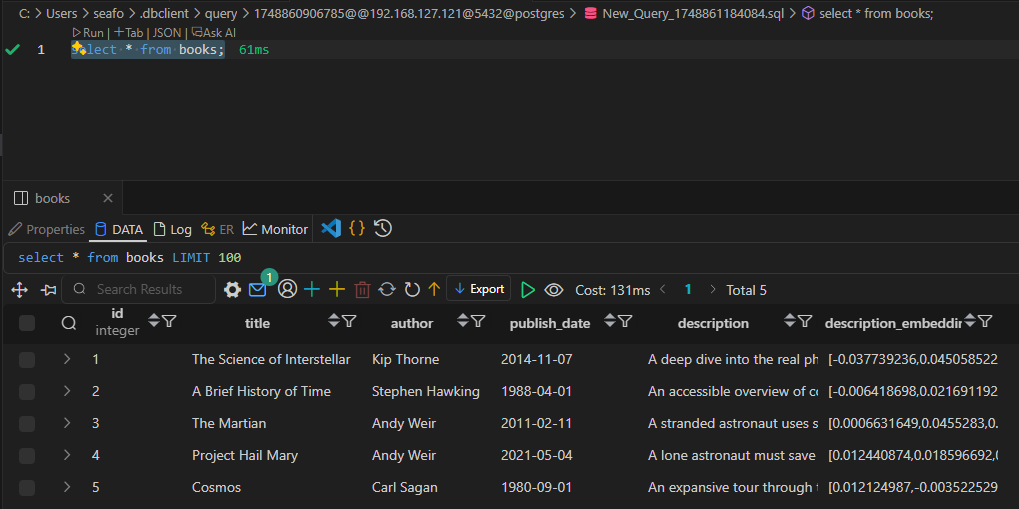
- Book database table with data.
select * from books;
Step 5: Vector search
- Vector similarity search (find books with similar descriptions). The search requires the search term to be converted into a vector. The
::vectorcast tells PostgreSQL to interpret the Python list (which arrives as a numeric[]) as a proper vector type for similarity search.
SELECT title, author, description_embedding <-> %s::vector AS distance
FROM books
ORDER BY distance ASC
LIMIT 5;
-
Create a python script bookshop-vectorsearch.py
-
Execute the python script
python3 bookshop-vectorsearch.py
- Script output
Title: The Martian, Author: Andy Weir, Distance: 0.8516
Title: Project Hail Mary, Author: Andy Weir, Distance: 0.9396
Title: The Science of Interstellar, Author: Kip Thorne, Distance: 1.0807
Title: A Brief History of Time, Author: Stephen Hawking, Distance: 1.1347
Title: Cosmos, Author: Carl Sagan, Distance: 1.1362