Flood Fill using OpenCV
To use the flood fill, first a seed point is selected. All neighbouring pixels whose colours are similar to the seed region are replaced with a uniform colour. Flood fill is useful for simple segmentation tasks, region filling, and cleaning up shapes before analysis. In this example the seed point is at 200, 200 (shown by a blue circle). The neighbouring pixels are then flood filled with a red colour.
#include "stdafx.h"
#include "cv.h"
#include "highgui.h"

int _tmain(int argc, _TCHAR* argv[])
{
	// load the input image
	IplImage* img = cvLoadImage("test.jpg");

	// define the seed point
	CvPoint seedPoint = cvPoint(200,200);

	// flood fill with red
	cvFloodFill(img, seedPoint, CV_RGB(255,0,0), CV_RGB(8,90,60), CV_RGB(10,100,70),NULL,4,NULL);

	// draw a blue circle at the seed point
	cvCircle(img, seedPoint, 3, CV_RGB(0,0,255), 3, 8);

	// show the output
	cvNamedWindow("Output", CV_WINDOW_AUTOSIZE);
    cvShowImage("Output", img);

	// wait for user
	cvWaitKey(0);

	// save image
	cvSaveImage("output.jpg",img);

	// garbage collection
	cvReleaseImage(&img);
	cvDestroyWindow("Output");
	return 0;
}
Input image
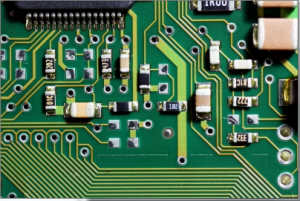
Output image

Explanation of cvFloodFill parameters
The example uses the old C API call cvFloodFill. Below is a simple explanation of the parameters used in the call shown above:
image: The image to be modified in place. The function fills pixels in this image.seedPoint: ACvPointthat marks the starting pixel for the flood fill. Filling spreads from this seed.newVal: ACvScalarcolour value used to set the filled region (for exampleCV_RGB(255,0,0)for red).loDiff: ACvScalarspecifying the lower brightness/color difference tolerance. Pixels with values not less thanseed - loDiffare considered for filling.upDiff: ACvScalarspecifying the upper brightness/color difference tolerance. Pixels with values not greater thanseed + upDiffare considered for filling.comp: Optional pointer to aCvConnectedCompstructure that receives information about the filled region. In the exampleNULLis passed because the component info is not needed.flags: Controls the connectivity and filling behavior. Common values include4or8for pixel connectivity. Flags can also request a mask or return the bounding rectangle.rect: Optional pointer to aCvRectthat, if provided, will receive the bounding rectangle of the filled region. The example passesNULL.
Notes:
- The
loDiffandupDiffparameters define how permissive the flood fill is. Larger values allow filling more varied neighbouring pixels. Tune these values to avoid overfilling. - The C API has been superseded by newer C++ functions such as
cv::floodFill, which has a similar parameter set but uses C++ types.
Expected output
Running the example produces an output image where the connected region around the seed point is replaced with the specified fill colour. The program also draws a small blue circle at the seed point to indicate the start location. The output is displayed in a window and saved as output.jpg.
- Filled region: The area connected to the seed and within the
loDiff/upDifftolerances will be painted red. - Seed marker: A blue circle marks the seed point at (200, 200).
- Saved file: The final image is written to
output.jpgin the working directory.
If the tolerances are too large, the fill may spread beyond the intended region. If they are too small, only the immediate area will be filled.