Archive for the ‘Programming’ Category.

Flood Fill using OpenCV

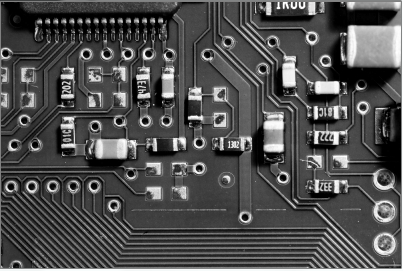
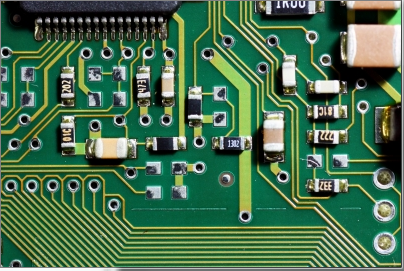
To use the flood fill, first a seed point is selected, then all neighbouring pixels of a similar colour are converted to a uniform colour. In this example the seed point is at 200, 200 (shown by a blue circle). The neighbouring pixels are then flood filled with a red colour.

#include "stdafx.h"
#include "cv.h"
#include "highgui.h"

int _tmain(int argc, _TCHAR* argv[])
{
	// load the input image
	IplImage* img = cvLoadImage("test.jpg");

	// define the seed point
	CvPoint seedPoint = cvPoint(200,200);

	// flood fill with red
	cvFloodFill(img, seedPoint, CV_RGB(255,0,0), CV_RGB(8,90,60), CV_RGB(10,100,70),NULL,4,NULL);
	
	// draw a blue circle at the seed point
	cvCircle(img, seedPoint, 3, CV_RGB(0,0,255), 3, 8);

	// show the output
	cvNamedWindow("Output", CV_WINDOW_AUTOSIZE);  
    cvShowImage("Output", img); 

	// wait for user
	cvWaitKey(0);

	// save image
	cvSaveImage("output.jpg",img);

	// garbage collection		
	cvReleaseImage(&img);
	cvDestroyWindow("Output");
	return 0;
}
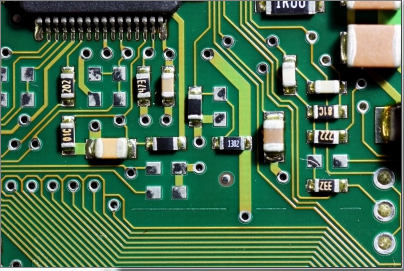
Input image
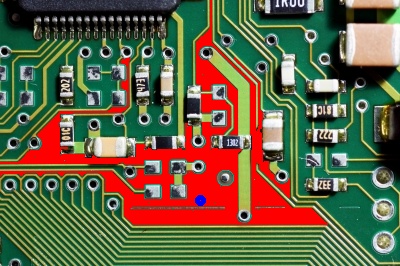
The flood filled output image
Drawing simple shapes using OpenCV

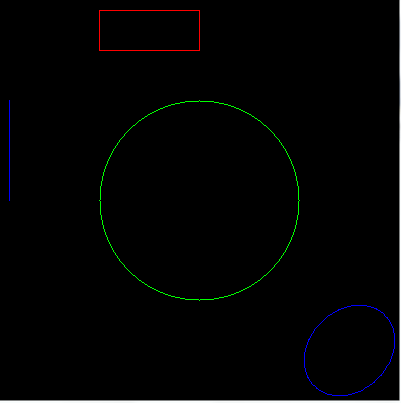
When creating Machine Vision and Image Processing Algorithms it is often useful to draw simple shape on to the image being processed. This simple example shows how to draw some basic shapes using OpenCV.

#include "stdafx.h"
#include "cv.h"
#include "highgui.h"

int _tmain(int argc, _TCHAR* argv[])
{
	// create the output image
	IplImage* output = cvCreateImage(cvSize(400,400),8,3);
	cvZero(output);

	// draw a line
	cvLine(output, cvPoint(10,100), cvPoint(10,200), CV_RGB(0,0,255), 1,8,0);

	// draw a rectangle
	cvRectangle(output, cvPoint(100,10), cvPoint(200, 50), CV_RGB(255,0,0), 1);

	// draw a circle
	cvCircle(output, cvPoint(200,200), 100, CV_RGB(0,255,0), 1, 8);

	// draw an ellipse
	cvEllipse(output, cvPoint(350,350), cvSize(40,50),45, 0, 360, CV_RGB(0,0,255),1,8);

	// show the output
	cvNamedWindow("Output", CV_WINDOW_AUTOSIZE);  
    cvShowImage("Output", output); 

	// wait for user
	cvWaitKey(0);

	// garbage collection		
	cvReleaseImage(&output);
	cvDestroyWindow("Output");
	return 0;
}

Drawing simple shapes using OpenCV

Splitting multichannel images into RGB using OpenCV

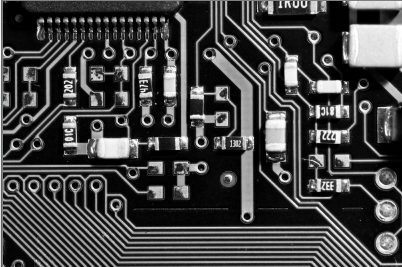
To separate a multi channel image into the three component RGB channels, we can use the cvSplit function. The example below opens a RGB image and then using the cvSplit function creates three output images.

#include "stdafx.h"
#include "cv.h"
#include "highgui.h"

int _tmain(int argc, _TCHAR* argv[])
{
	// open and display input image  
    IplImage* input = cvLoadImage("test.jpg");  
    cvNamedWindow("Input", CV_WINDOW_AUTOSIZE);  
    cvShowImage("Input", input); 

	// create the output images
	IplImage* output_r = cvCreateImage(cvSize(input->width, input->height), input->depth, 1);
	IplImage* output_g = cvCreateImage(cvSize(input->width, input->height), input->depth, 1);
	IplImage* output_b = cvCreateImage(cvSize(input->width, input->height), input->depth, 1);

	// split the image
	cvSplit(input, output_r, output_g, output_b,NULL);
	
	// display image
	cvNamedWindow("Output R", CV_WINDOW_AUTOSIZE);
	cvShowImage("Output R", output_r);

	cvNamedWindow("Output G", CV_WINDOW_AUTOSIZE);
	cvShowImage("Output G", output_g);

	cvNamedWindow("Output B", CV_WINDOW_AUTOSIZE);
	cvShowImage("Output B", output_b);

	// wait for user
	cvWaitKey(0);

	// garbage collection	
	cvReleaseImage(&input);
	cvDestroyWindow("Input");
	cvReleaseImage(&output_r);
	cvDestroyWindow("Output R");
	cvReleaseImage(&output_g);
	cvDestroyWindow("Output G");
	cvReleaseImage(&output_b);
	cvDestroyWindow("Output B");
	return 0;
}

Input Image

Blue Channel

Green Channel

Red Channel

OpenCV Hello World

Here is the Hello World example code for OpenCV. This simple example creates a image called output, then the text “Hello World” is added to the image.

#include "stdafx.h"
#include "cv.h"
#include "highgui.h"

int _tmain(int argc, _TCHAR* argv[])
{
	// create image
	IplImage* output = cvCreateImage(cvSize(400, 200), 8, 3);
	
	// create font and add text to the image
	CvFont font;
    cvInitFont(&font, CV_FONT_HERSHEY_SIMPLEX, 1,1,0,1,8);
	cvPutText(output, "Hello World", cvPoint(100,100), &font, cvScalar(255,255,0));
	
	// display image
	cvNamedWindow("Output", CV_WINDOW_AUTOSIZE);
	cvShowImage("Output", output);

	// wait for user
	cvWaitKey(0);

	// garbage collection	
	cvReleaseImage(&output);
	cvDestroyWindow("Output");
	
	return 0;
}

Hello World output image

Gaussian image smoothing using OpenCV

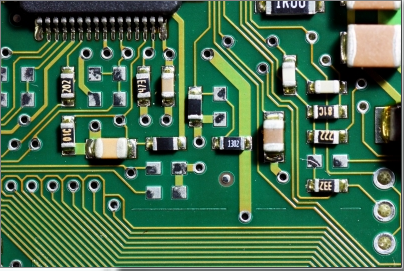
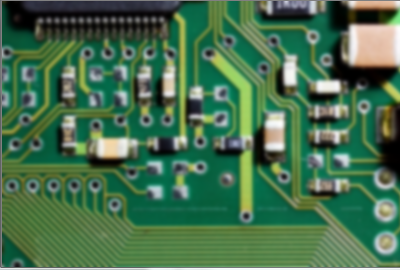
Image smoothing is often used in digital image processing to reduce noise or camera artifacts. An example of a common algortihm used to perform image smoothing is Gaussian. Gaussian filtering is done by convolving each pixel in the input image with a Gaussian Kernal and then summing to produce the output image.

#include "stdafx.h"
#include "cv.h"
#include "highgui.h"

int _tmain(int argc, _TCHAR* argv[])
{
	// open and display input image
	IplImage* input = cvLoadImage("test.jpg");
	cvNamedWindow("Input", CV_WINDOW_AUTOSIZE);
	cvShowImage("Input", input);

	// create the output 
	IplImage* output = cvCreateImage(cvSize(input->width, input->height), input->depth, input->nChannels);
	cvSmooth(input, output, CV_GAUSSIAN, 9);

	// display the output image
	cvNamedWindow("Output", CV_WINDOW_AUTOSIZE);
	cvShowImage("Output", output);

	// wait for user
	cvWaitKey(0);

	// garbage collection
	cvReleaseImage(&input);
	cvReleaseImage(&output);
	cvDestroyWindow("Input");
	cvDestroyWindow("Output");
	
	return 0;
}

Input image

Output Image after smoothing

Create m3u playlist from directory list

This little command script iterates all sub folders to create an m3u playlist containing mp3 files. The m3u playlist can then be played using winamp.

To create the command script, open a text editor and add the following line.

dir *.mp3 /b /s > "playlist.m3u"

Next save the file as create-playlist.cmd. To execute place the command script in the same folder as the mp3s and double click create-playlist.cmd, this will generate playlist.m3u. Then open playlist.m3u in winamp.

Sound Buttons

Sound Buttons are a technique used to teach children to read. This function generates the sound buttons for a given word, uing the Jolly Phonics system. This approach breaks each word into the groups of letter sounds, of which there are 42 letter sounds.

/**
 * Generates phonics for a given word.
 * This function uses the Jolly Phonics, synthetic phonics programme.    
 * @param input The input word
 * @return array of phonemes
 */   
function phonomes($input)
{
  // create the output array
  $output = array();
  
  // create the Phoneme arrays
  $phoneme3 = array('ear','igh');
  $phoneme2 = array('ai','ar','ch','ck','ee','er','ie','ng','oa','oi','oo','or','ou','ow','qu','sh','th','ue','ue','ur');
  
  // process the input word
  $word =strtolower($input);
  $word = trim($word);
  $letterCount = strlen($word);
  $index = 0;
  
  // iterate each letter in the word searching for phonemes
  while($index <$letterCount)
  {
    if (in_array(substr($word, $index, 3), $phoneme3))
    {
      // found a three letter phoneme
      $output[] = substr($word,$index, 3);
      $index += 3;
    }
    else if (in_array(substr($word, $index, 2), $phoneme2))
    {
      // found a two letter phoneme
      $output[] = substr($word,$index, 2);
      $index += 2;
    }
    else
    {
      //found a single letter phoneme
      $output[] = substr($word,$index, 1);
      $index++;    
    }   
  }
  return $output;
}

To test the phonomes function use

foreach(array('this','moth','that','three','them','thin','quick','quilt','liquid','squid') as $test)
{
  print "$test = " . implode(' - ', phonomes($test)) . "
"; }

This produces the following output

this = th - i - s
moth = m - o - th
that = th - a - t
three = th - r - ee
them = th - e - m
thin = th - i - n
quick = qu - i - ck
quilt = qu - i - l - t
liquid = l - i - qu - i - d
squid = s - qu - i - d

To see this function working please visit Dylan Seaford

Convert time in seconds to HH:MM:SS

## Convert time in seconds to hours:minutes:seconds
# @param sec Time in seconds
# @return The time in hh:mm:ss format
def SecToTime(Sec): 
  H = int(Sec / 3600)
  M = int(Sec / 60 - H * 60)
  S = int(Sec - (H * 3600 + M * 60))

  if len(str(H)) == 1: time = "0" + str(H) + ":"
  else: time = str(H) + ":"
 
  if len(str(M)) == 1: time = time + "0" + str(M) + ":"
  else: time = time + str(M) + ":"

  if len(str(S)) == 1: time = time + "0" + str(S) 
  else: time = time + str(S) 
  
  return time
  pass

Get Web Page Content as a String with C#

This function dowloads the html content of a webpage and returns the content as a string.

public static string GetWebPageAsString(string url) {
    HttpWebRequest httpWebRequest =(HttpWebRequest)WebRequest.Create(url);
    HttpWebResponse httpWebResponse = (HttpWebResponse)httpWebRequest.GetResponse();
    Stream stream = httpWebResponse.GetResponseStream();
    StreamReader streamReader = new StreamReader(stream, Encoding.ASCII);
    return streamReader.ReadToEnd();
}

Recursive delete files and folders using C#

This function will Recursively delete all files and folders.

private void DeleteAllFiles(string sPath)
{
    foreach(string strFile in Directory.GetFiles(sPath))
    {
        File.Delete(strFile);
    }
    foreach (string strDir in Directory.GetDirectories(sPath))
    {
        DeleteAllFiles(strDir);
    }
    Directory.Delete(sPath);
}